
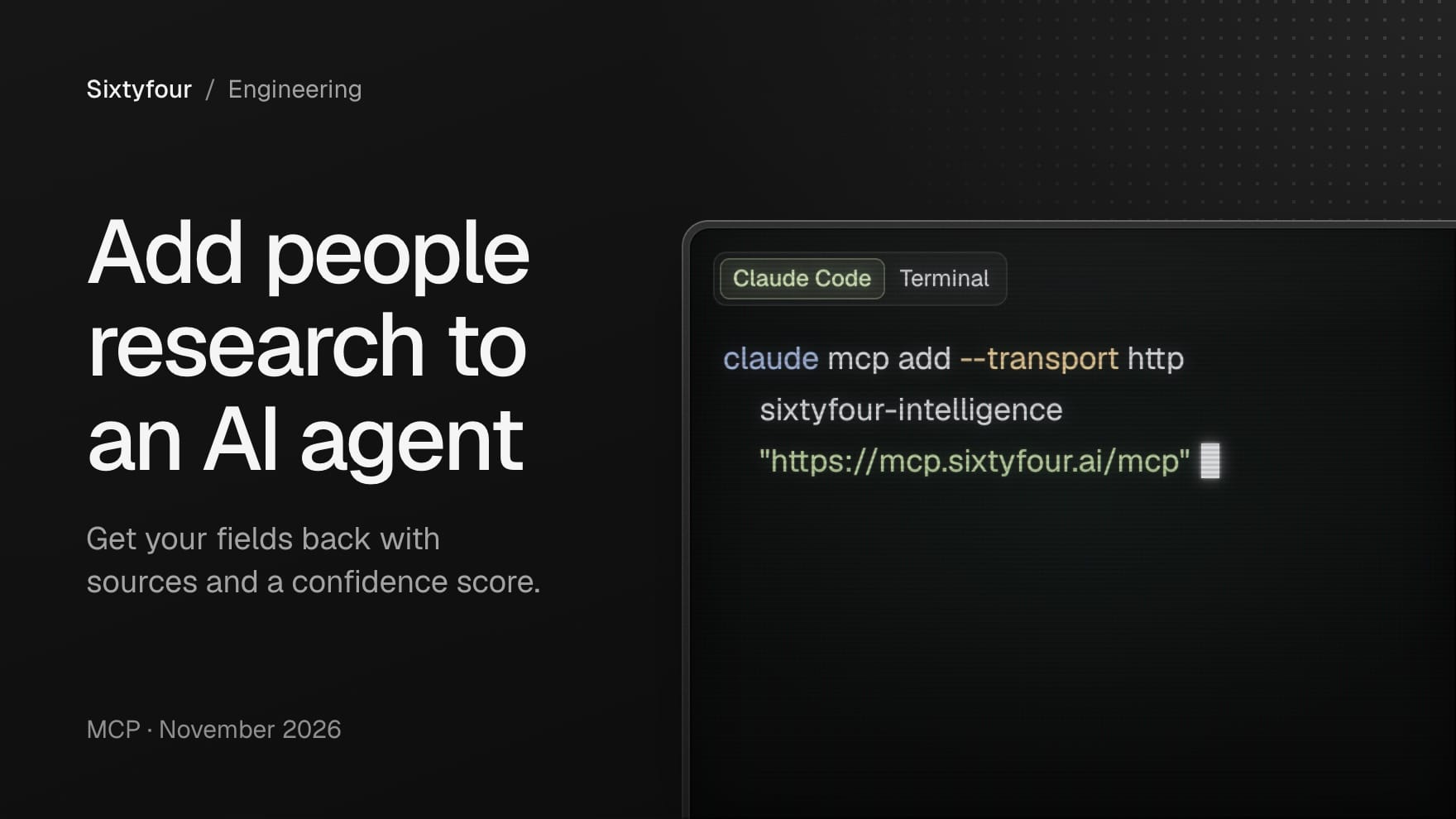
To add people and company research to an AI agent, connect the agent's MCP client to a server that exposes research as tools. The agent then starts a research job, polls it, and reads back the fields it asked for with the sources behind them. Sixtyfour hosts one at https://mcp.sixtyfour.ai/mcp: give it what you know about a person or a company, such as a name, a company, an email address or a profile URL, and it returns the fields you define with source URLs and a confidence score. It works in Cursor, VS Code, Windsurf, Claude Code, Claude Desktop, Codex and ChatGPT, signed in with OAuth or an API key.
Every config below is copied from our MCP setup docs, checked on 4 November 2026.
What is MCP?
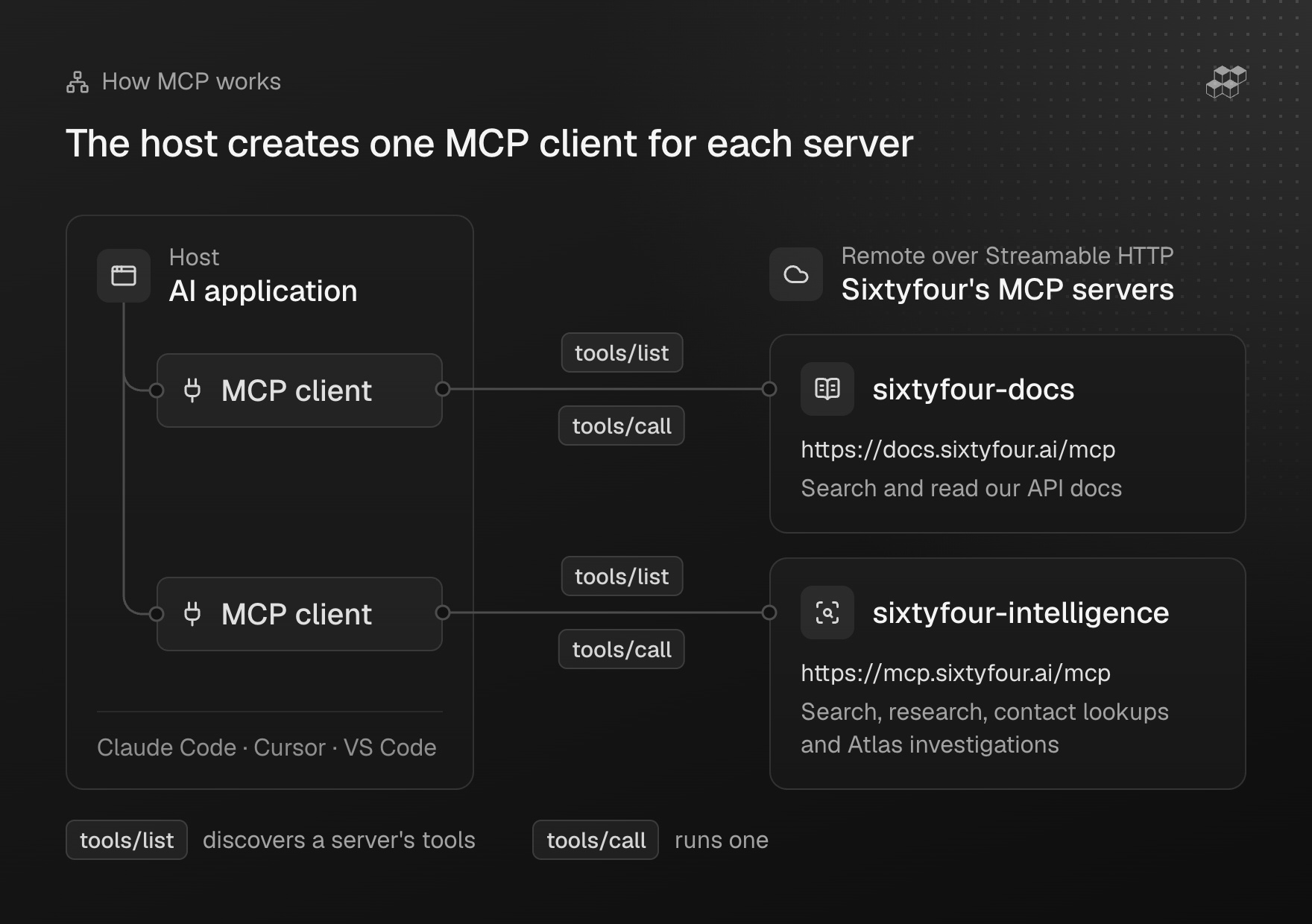
The Model Context Protocol describes itself as "an open-source standard for connecting AI applications to external systems". An AI application such as Claude Code or VS Code acts as the host. It creates one MCP client for each server it connects to, and each server can offer tools, resources and prompts. Tools are the part that matters here: the protocol's architecture overview describes them as functions "AI applications can invoke to perform actions", and a client discovers a server's tools with tools/list and runs one with tools/call.
A server can run locally over standard input and output, or remotely over Streamable HTTP, which "supports standard HTTP authentication methods including bearer tokens, API keys, and custom headers". Ours are remote, so there is nothing to host. Each tool describes its inputs with a JSON Schema, and the server concepts page notes that "the model requests tool execution based on context", so the model decides when to call a tool from what the user asked.
Why does a research agent need more than web search?
Searching a name returns pages that contain the name. The research job is deciding which of those pages describe the person you mean, and keeping the source for each fact you take from them. A name can belong to two people, and a profile can be years out of date. When we built RECON, our benchmark for people research (it also scores five of our own systems), we paired roughly a quarter of its 140 people with a same-named decoy, and a name or username match alone was not enough to establish a reference answer.
A research tool does that attribution step and says how sure it is. Our per-field confidence scores measure that step: each one "reflects how much assumption is needed to tie the value back to the target person or company." Web search stays the right tool for finding pages, and the research tool comes after it. Our guide to identity resolution covers how that matching works.
Connecting your client with Sixtyfour's MCP servers
We host two servers.
| Server | URL | Auth | What it gives the agent |
|---|---|---|---|
sixtyfour-docs | https://docs.sixtyfour.ai/mcp | None | Search and read our API docs |
sixtyfour-intelligence | https://mcp.sixtyfour.ai/mcp | OAuth or API key | Search, research, contact lookups and Atlas investigations |
The intelligence server accepts OAuth sign-in with your Sixtyfour account, or an API key in an x-api-key header. A client that cannot set headers can pass the key on the URL as ?api_key=YOUR_API_KEY, and our docs give the reason to avoid it: "a key in a URL can end up in logs and shared config files, so prefer the header." Usage is billed to the organisation of the signed-in user or the key. With OAuth no key sits in a config file, and our Claude Code instructions mark it as recommended.
Install the docs server too. Its search and read tools let the agent look up a parameter itself instead of guessing it.
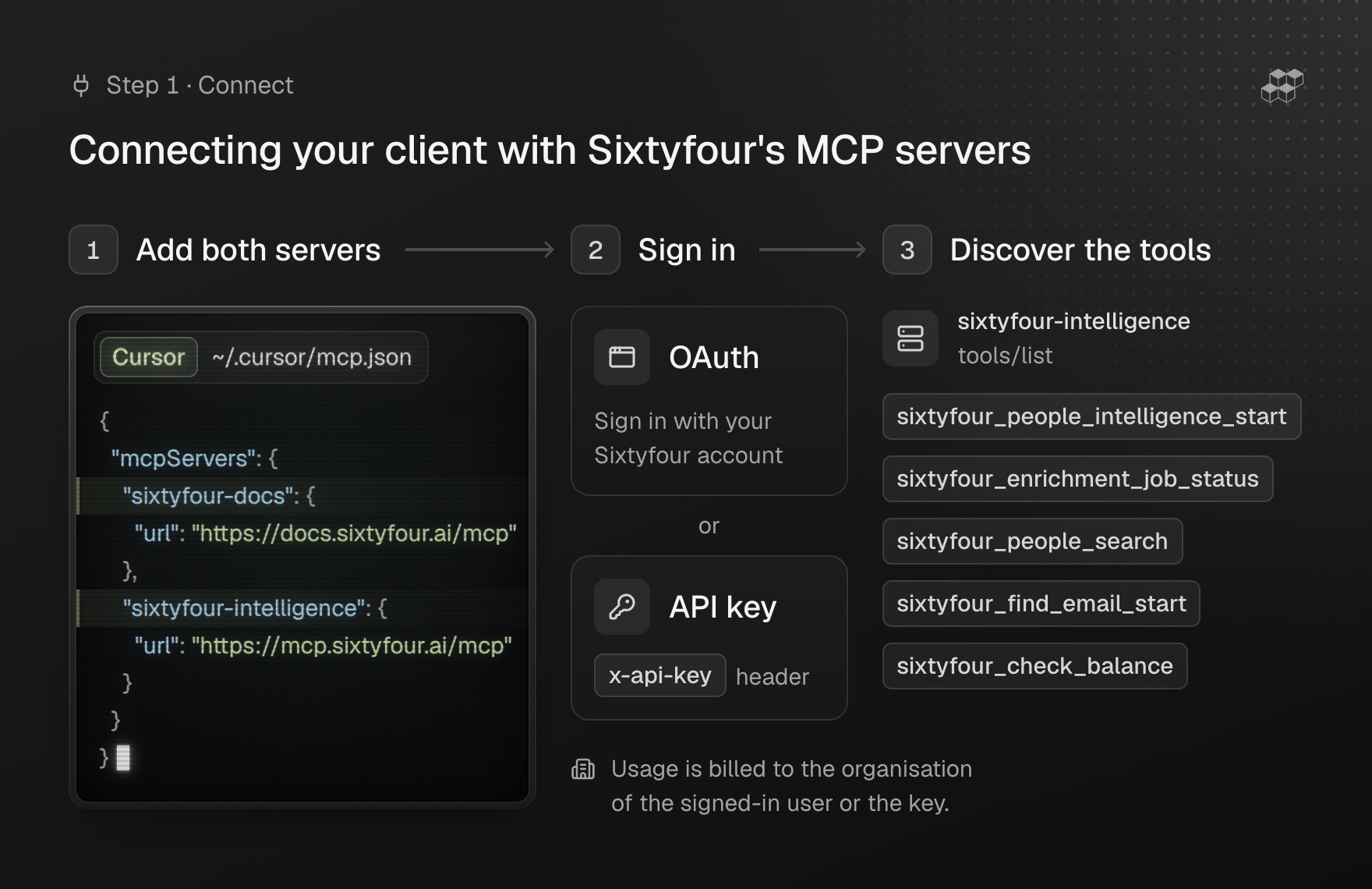
headers and Cursor opens a browser sign-in on first use.Cursor and VS Code
Cursor reads ~/.cursor/mcp.json for every project, or .cursor/mcp.json for one. With an API key:
{"mcpServers": {"sixtyfour-docs": {"url": "https://docs.sixtyfour.ai/mcp"},"sixtyfour-intelligence": {"url": "https://mcp.sixtyfour.ai/mcp","headers": {"x-api-key": "YOUR_API_KEY"}}}}
To sign in with OAuth instead, leave out headers, and Cursor opens a browser sign-in on first use:
{"mcpServers": {"sixtyfour-intelligence": {"url": "https://mcp.sixtyfour.ai/mcp"}}}
Cursor limits tool names to 60 characters and shortens longer ones with a hash suffix, and a tool still works when Cursor warns about it. In VS Code the file is .vscode/mcp.json in the project root, and each server takes a type:
{"servers": {"sixtyfour-docs": {"type": "http","url": "https://docs.sixtyfour.ai/mcp"},"sixtyfour-intelligence": {"type": "http","url": "https://mcp.sixtyfour.ai/mcp","headers": {"x-api-key": "YOUR_API_KEY"}}}}
Windsurf
Windsurf's file is ~/.codeium/windsurf/mcp_config.json. Our documented config passes the key on the URL, so treat the file as a secret and keep it out of shared repositories:
{"mcpServers": {"sixtyfour-docs": {"url": "https://docs.sixtyfour.ai/mcp"},"sixtyfour-intelligence": {"url": "https://mcp.sixtyfour.ai/mcp?api_key=YOUR_API_KEY"}}}
Claude Code and Claude Desktop
In Claude Code, add both servers from a terminal. The intelligence server then opens a browser sign-in on first use:
claude mcp add --transport http sixtyfour-docs "https://docs.sixtyfour.ai/mcp"claude mcp add --transport http sixtyfour-intelligence "https://mcp.sixtyfour.ai/mcp"
With an API key instead:
claude mcp add --transport http sixtyfour-intelligence "https://mcp.sixtyfour.ai/mcp" --header "x-api-key: YOUR_API_KEY"
Add --scope user to make a server available across all your projects. In Claude Desktop, add two custom connectors, Sixtyfour Docs with the remote URL https://docs.sixtyfour.ai/mcp and Sixtyfour Intelligence with https://mcp.sixtyfour.ai/mcp, and Claude Desktop handles the OAuth sign-in for the intelligence server when it first connects.
Codex and ChatGPT
In Codex, register the marketplace for our plugin, then install it:
codex plugin marketplace add sixtyfour-ai/sixtyfour-codex-plugincodex plugin add sixtyfour@sixtyfour
Start a new Codex session afterwards, because plugins load when a session starts, and run codex mcp login sixtyfour-intelligence when it asks you to authenticate. To configure it by hand instead, add the server to ~/.codex/config.toml, restart Codex and sign in when prompted:
[mcp_servers.sixtyfour-intelligence]command = "npx"args = ["-y", "mcp-remote", "https://mcp.sixtyfour.ai/mcp"]
In ChatGPT the same plugin is in the Plugins directory: turn on Work mode, search for Sixtyfour in Plugins, install it and authenticate the intelligence server. OpenAI sets which plans can install plugins, and on Enterprise, Edu and Business workspaces an admin has to allow marketplace plugins first.
What can an agent do with the tools?
These are the intelligence server's main tool groups.
| Group | Tools | What the agent uses them for |
|---|---|---|
| Account | sixtyfour_check_balance | Check credits before a large job |
| Search | sixtyfour_people_search and sixtyfour_company_search, with tools to list fields, explore values, page and expand results | Find people or companies that match structured filters |
| Lookalike | sixtyfour_find_similar_start, with its own status and results tools | Find people similar to up to 1,000 seed profiles |
| Research | sixtyfour_people_intelligence_start, sixtyfour_company_intelligence_start | Research one person or company and return the fields you define |
| Contact lookups | sixtyfour_find_email_start, sixtyfour_find_phone_start and two reverse lookups | Find email addresses or phone numbers for 1 to 100 leads, or the person behind them |
| Bulk research | People and company bulk start tools | Research the same fields for up to a few hundred rows in one job |
| Atlas | sixtyfour_atlas_start, with tools to poll, list and read investigations | Run and read deep investigations, shown only where Atlas is enabled |
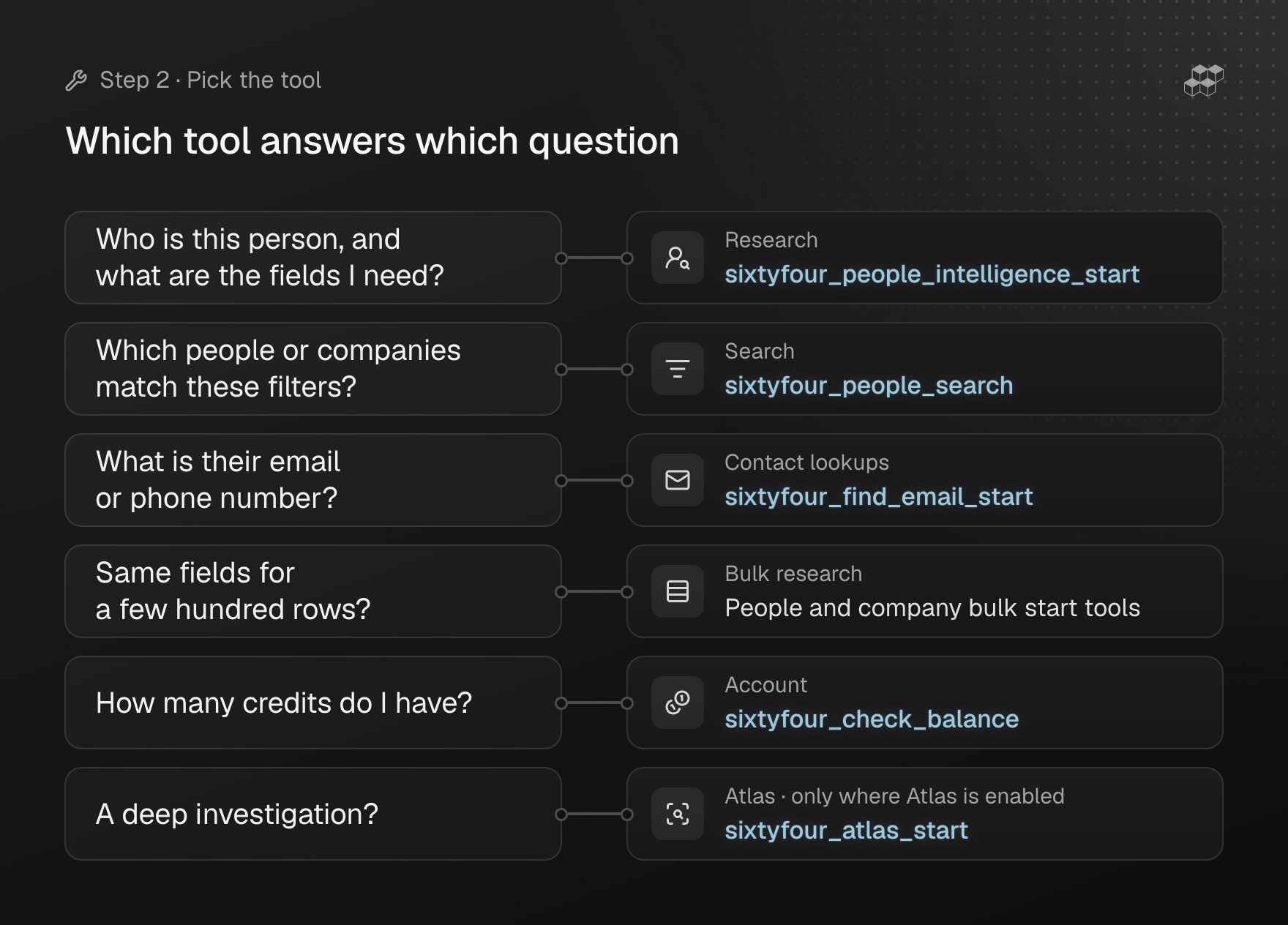
The two research tools are the core of a people research setup. They call our People Intelligence and Company Intelligence endpoints. For a person, the input is lead_info, any combination of a name, title, company, location, LinkedIn URL, email address and other keys. For a company it is target_company: a company name, domain, website, LinkedIn page or location. Both take a struct, in which each key becomes an output field and its value tells the agent what to find, and our docs note that "Specific descriptions return better results". The start tools accept the micro, low, medium and high tiers, high is enabled on request, and the deeper xhigh research runs through the Atlas tools.
Two habits from our Skills troubleshooting notes carry over. Use the medium tier, because the default low tier "misses people with little online presence or common names", and pass every identifier you have in lead_info. For an email address or phone number, call the contact lookups: the Skill's instructions point out that a research job "can come back without contact details they would find".
The search tools take a simple_filters query, and count_only returns how many people match without any profiles. Result handles and cursors expire after 20 minutes, so a stale page means running the search again.
How does long-running research come back?
People and Company Intelligence runs "take up to 10 minutes", and Atlas runs take longer. So each research and contact tool ends in _start and returns a task_id at once, and the agent polls sixtyfour_enrichment_job_status with it until the job reaches a final status: completed, failed, cancelled, terminated or timed_out. The completed response carries the result, the charge_credits the job used and its task_type. Lookalike searches and Atlas investigations have their own status tools. On the API the pattern is POST /people-intelligence-async, which answers at once:
{"task_id": "3f8b2c1e-...", "status": "RUNNING"}
and then GET /job-status/{task_id} until the job is done, as our async jobs page describes.
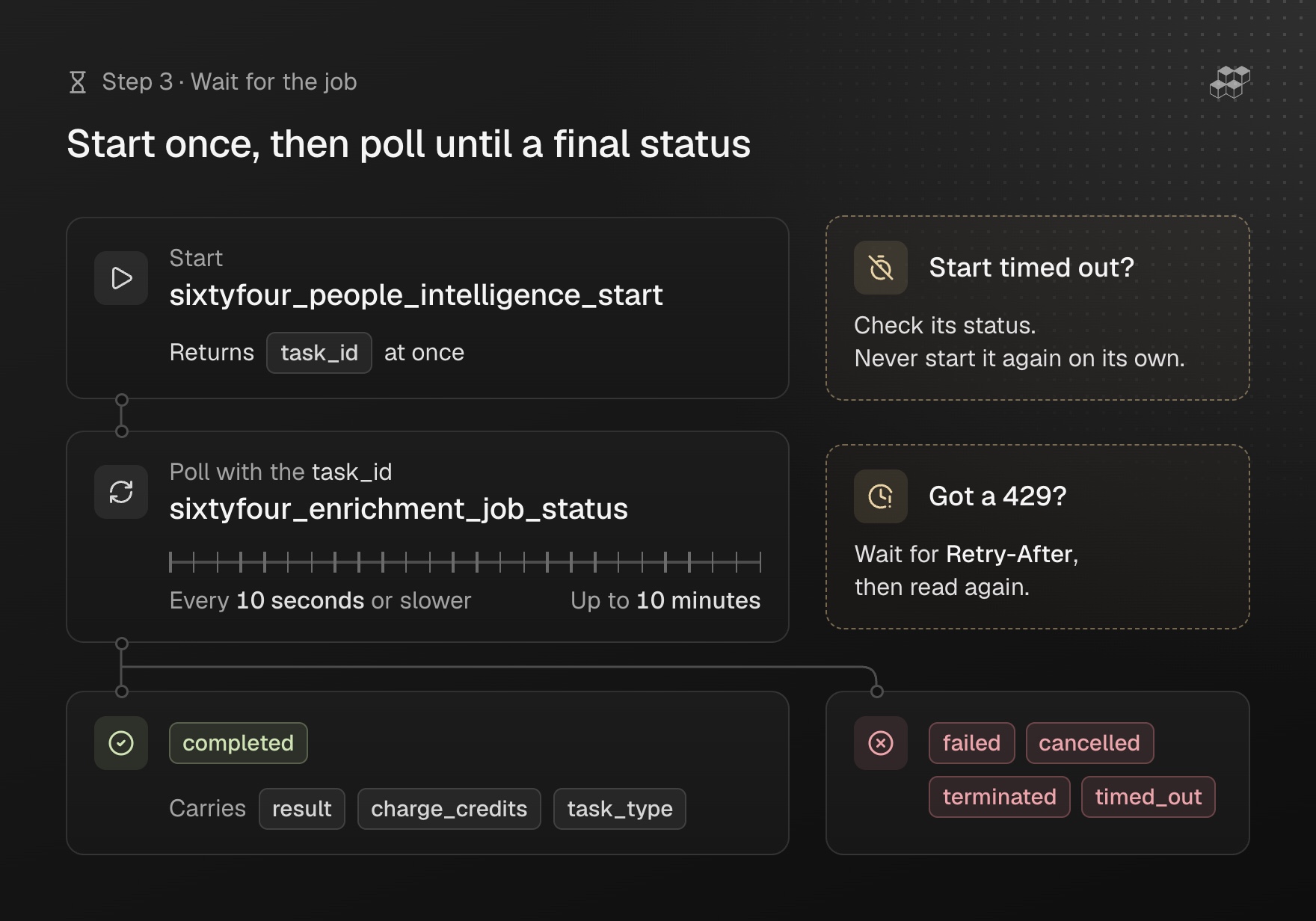
Two rules matter more for an agent than for a script, because an agent retries on its own. First, our docs warn that tools ending in _start create billable work, and "a start call that times out may still have created the job, so do not repeat it automatically." We put that in the agent's instructions: after a timeout, check the job's status or ask the user, and never start the job again unprompted. An Atlas start can be retried with the same request_id and inputs. On the API, a dispatch_id makes a People Intelligence start safe to repeat, while Company Intelligence takes none, so a repeated start runs and charges again.
Second, poll gently: one poll per job every 10 seconds or slower. Status reads share one budget per organisation, 300 a minute with a burst of 15, enough for about 50 jobs in flight at that pace, and the rate limits page says every key and OAuth token, "including keys used through the MCP server", draws on the same budgets. A 429 on a status read does not affect the job, so the agent waits for Retry-After and reads again. Have it save each result as soon as the job completes, because job status keeps a finished job only for a limited time, with no guaranteed window.
How should an agent use confidence and sources?
A completed People Intelligence result has four parts: structured_data, one key per field you asked for; notes, a short summary; references, mapping each source URL to what was found there; and a confidence score. By default that score is a single confidence_score from 0 to 10 for the whole record. Ask for field confidence and each field gets its own entry instead: a 0 to 100 score, a short justification and the URLs the value was read on. It costs nothing extra and needs no access request. On the API the request looks like this:
{"lead_info": {"full_name": "Jane Smith", "company": "Acme Corp"},"struct": {"email": "Email address","title": "Current job title","linkedin": "LinkedIn profile URL"},"tier": "medium","field_confidence": true}
and each field comes back like this, trimmed here to the title:
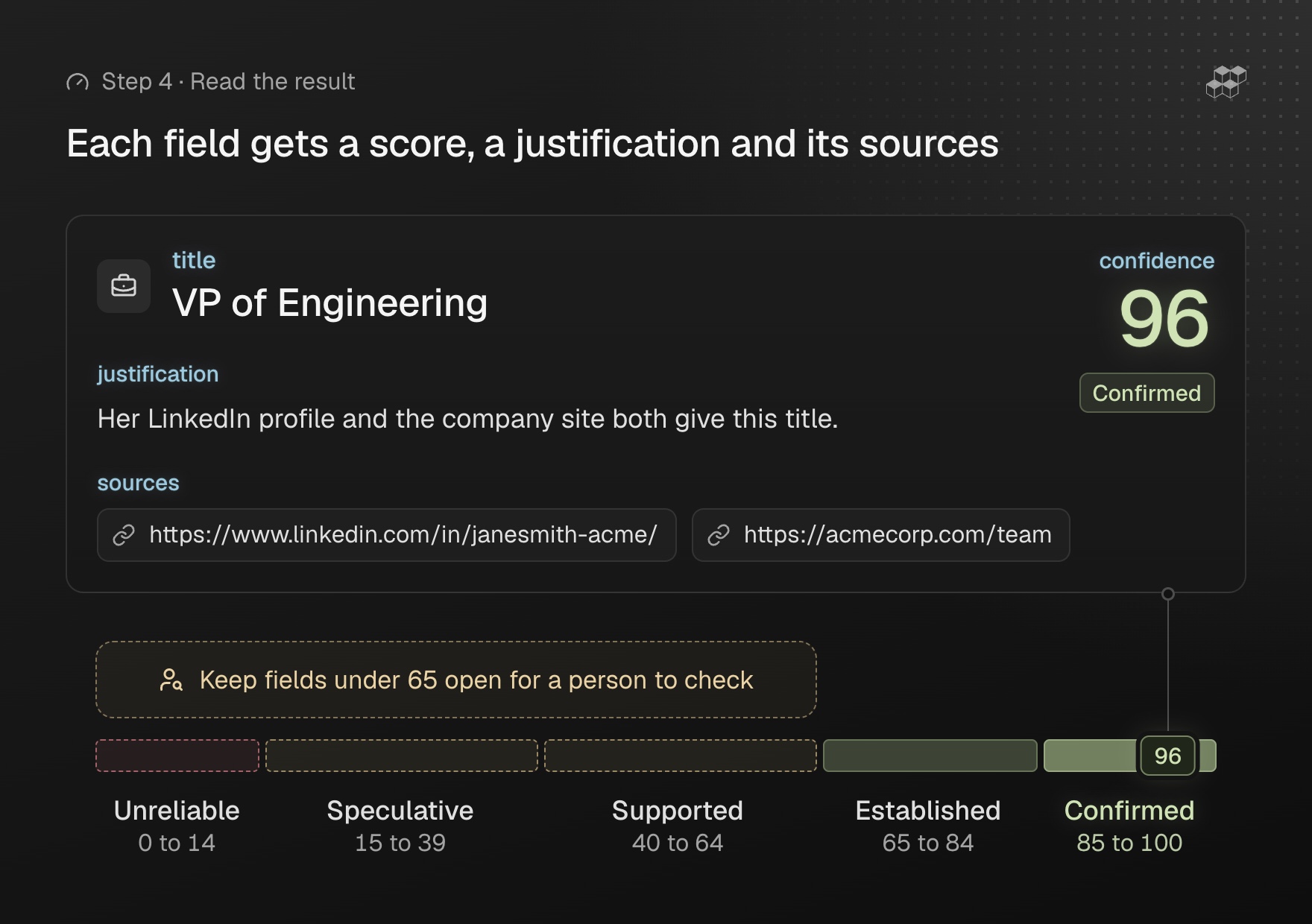
{"structured_data": {"title": "VP of Engineering"},"field_confidence": {"title": {"confidence": 96,"justification": "Her LinkedIn profile and the company site both give this title.","sources": ["https://www.linkedin.com/in/janesmith-acme/", "https://acmecorp.com/team"]}}}
Our docs map the 0 to 100 scale to named levels:
| Score | Level | What it means |
|---|---|---|
| 85 to 100 | Confirmed | Near-zero assumption: unique identifiers, direct assertions from authoritative sources |
| 65 to 84 | Established | Minimal assumption; a careful person would rely on it |
| 40 to 64 | Supported | Moderate assumption; the link is reasonable but not tight |
| 15 to 39 | Speculative | Significant assumption; treat it as a hypothesis |
| 0 to 14 | Unreliable | Major assumption or conflicting evidence; do not rely on it |
confidence_score instead.Through MCP, the single-record start tools take lead_info or target_company, struct, tier and an optional research_plan. As of November 2026 they do not take field_confidence, so their jobs return the record-level confidence_score with references and notes. Check the input schema your client shows before an agent depends on per-field scores.
These are the instructions we give an agent that uses Sixtyfour results:
- Report every field with a source URL, and with its confidence level where the result has per-field scores, and keep the URL next to the fact in any summary.
- Keep open any field under 65, the bar our docs suggest for cold outreach, or, with only a record-level score, any field that one page supports: say what was found, call it unconfirmed and say what would confirm it.
- Treat a
nullconfidence as an echo of the input: the docs say it is null "when the value rests only on the input you sent". - Tell the user when
sourcesis empty, because the value "came from a source with no public page" and they cannot open it. - Read
notesbefore storingstructured_data. On the API, an Atlas run the agents decline still reportscompleted, with notes that startDeclined:and data that repeats the input. - Expect a common name to lower every score, since in our docs' words "the weakest link dominates".
- Leave an empty field empty, and never fill it from the model's own knowledge.
When should you use Agent Skills instead?
Agent Skills give an AI coding assistant instructions instead of tools. Our skills repository packages Sixtyfour as one directory of instructions and a polling script, poll_job.py, that teaches the assistant to call our REST API correctly with your API key. The Skills page puts the choice plainly: "To give an assistant tools instead of instructions, use the MCP Server."
We reach for the Skill when the assistant is writing code against the API, or when a client has no MCP support. In Claude Code, install it with:
npx skills add sixtyfour-ai/skills --skill "sixtyfour"
In Cursor, use the Cursor Plugin Directory listing or clone the repository into ~/.cursor/plugins/local/sixtyfour. The Skill reads your key from the environment of the shell the agent runs in:
export SIXTYFOUR_API_KEY=YOUR_API_KEY
What does it cost?
The pricing guide says MCP tools "call the same endpoints and are charged the same way". List prices in credits, as of November 2026:
| Operation | Credits |
|---|---|
People Intelligence at micro, low, medium, high | 0.3, 1, 20, 40 per person |
| Company Intelligence at the same tiers | 0.3, 1, 5, 15 per company |
Atlas investigation (xhigh) | 250 per unit of research |
| Find Email (professional) or Reverse Email | 0.5 per result found |
| Find Phone or Reverse Phone | 3 per result found |
| People or company filter search | 0.1 per result returned |
| Job status polling, balance checks, field confidence | Free |
A failed single-record job outside Atlas is not charged. The bulk start tools return estimated_cost_credits, which the docs call "a lower bound on the job's cost". The Free plan gives 64 credits once, to the organisation created at sign-up. Paid plans start at 100 credits a month on Individual, top-up credits cost $0.30 each with a $50 minimum on an active paid plan, and Enterprise contracts can set their own rates.
A worked example
This is a composite. Corinne Hesterlow, Haskervale Logistics and Harkmere Freight are invented, and the domain uses the .example name reserved for documentation.
A partnerships lead has an introductory call on Thursday with Corinne Hesterlow, head of operations at Haskervale Logistics. She uses Claude Desktop with the Sixtyfour Intelligence connector, signed in with OAuth, and asks it to research Corinne and her company before the call, with a source for each fact.
The agent made two start calls. sixtyfour_people_intelligence_start took Corinne's name and company as lead_info, three fields in struct (current title, start date in that role and earlier employers) and the medium tier. sixtyfour_company_intelligence_start took the company's name and https://haskervale.example as target_company, with headquarters, employee count and 2026 news as fields, also at medium. It polled sixtyfour_enrichment_job_status for both task IDs every ten seconds, and both completed within ten minutes.
| Field | Value | Pages in references | In the brief |
|---|---|---|---|
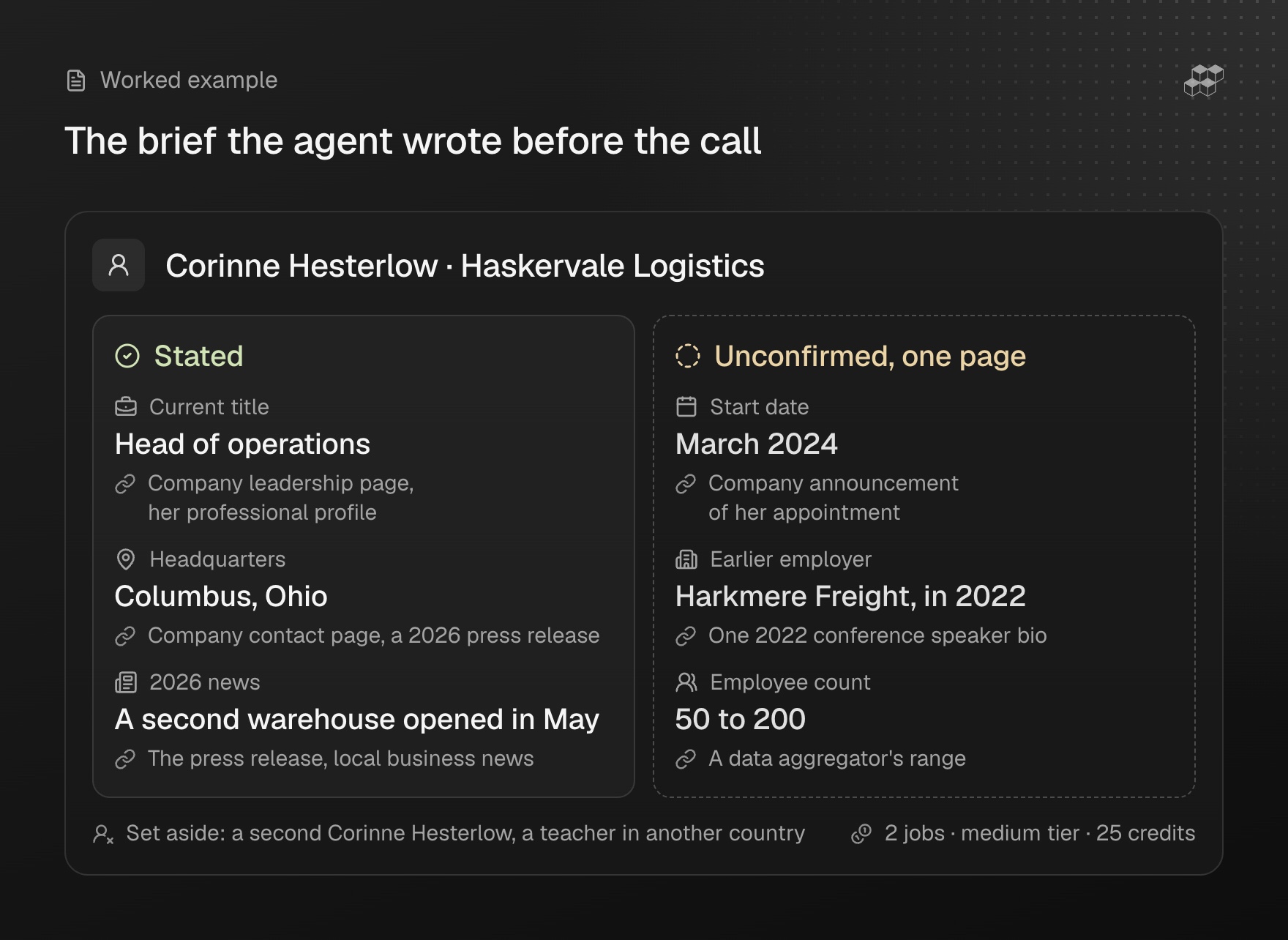
| Current title | Head of operations | Company leadership page, her professional profile | Stated |
| Start date | March 2024 | Company announcement of her appointment | Unconfirmed, one page |
| Earlier employers | Harkmere Freight, in 2022 | One 2022 conference speaker bio | Unconfirmed, one page |
| Headquarters | Columbus, Ohio | Company contact page, a 2026 press release | Stated |
| Employee count | 50 to 200 | A data aggregator's range | Unconfirmed, one page |
| 2026 news | A second warehouse opened in May | The press release, local business news | Stated |
The person record came back with a confidence_score of 7 out of 10 and the company record with 8. The people job's notes said a second Corinne Hesterlow, a teacher in another country, had been set aside because neither her employer nor her location matched. The two jobs charged 25 credits at list price.
The agent wrote the brief as its instructions asked: the title, headquarters and warehouse as stated, each with a link, and the start date, the earlier employer and the headcount under "unconfirmed", each with its one source.
What the person still checked: she opened the appointment announcement herself, because her first question depended on the start date. She left the headcount out, and asked Corinne about Harkmere Freight instead of stating it. Corinne confirmed it, and mentioned a year at a second company that the bio did not cover. Sixtyfour returned the public record with its sources, and the facts that rested on one page stayed questions until a person checked them.
Reading the results fairly
- A source says what it said when it was written, and an old bio can be accurate and out of date at once.
- An empty or low-scored field is a lead to follow. Someone with little online presence leaves less to find, and an absent record says little about whether a fact is true.
- The agent writes the summary. A short summary can lose a hedge, so the confidence level and the source need to travel with each fact into whatever the user reads.
- Benchmarks describe a test set. We built RECON, and five of the systems it evaluates are ours. Sixtyfour XHigh, the engine the Atlas tools run, scored 70.6 percent weighted accuracy (correct answers minus wrong ones, divided by all 514 fields), with 434 correct, 71 wrong and 9 missing. High scored 54.3 percent, Medium 44.7 percent, and the strongest system from another company 41.1 percent. HUD validated the benchmark externally, and a GPT-4.1 mini judge graded the answers, agreeing with human review on 98.5 percent of a 200-field sample. Weighted accuracy rewards correct answers and penalises wrong ones, and on precision alone another system on the board scores higher than XHigh. Your subjects will differ from RECON's 140 people.
- The research covers public sources. It does not run consumer background checks or credit reports, or verify identity documents. What it could not establish comes back open, and a person decides what to do with it.
For research on a person ahead of a larger decision, our guide to due diligence on a person covers the checks a person still owns.
The short version
Connect your client to https://mcp.sixtyfour.ai/mcp with OAuth, or with an API key in the x-api-key header, and add the docs server so the agent can look up parameters. Let the agent start research jobs, poll them every ten seconds or slower, never repeat a start that timed out, and save each result when it completes. Have it report every field with its source, and its confidence where the result scores each field, and keep anything under 65 or resting on one page open for a person to check. Sixtyfour returns the fields you define with the sources behind them, so the agent's answer stays one your team can verify.